
Products

Mic Pre 500
DAKING Mic Pre 500

FET III Stereo Compressor
DAKING Mic Pre One

Mic Pre One
DAKING Mic Pre One

FET Compressor II
DAKING FET Compressor II

Mic Pre IV
DAKING Mic Pre IV

Mic Pre EQ
DAKING Mic Pre EQ

Sales Office

TransAudio Group
7320 Smoke Ranch Road
Suite G
Las Vegas, NV. 89128
702-365-5155
fax: 702-365-5145
sales@transaudiogroup.com

Engineering

Daking Audio Inc.
(302) 482-4898
geoff@daking.com

dave@daking.com


Mic Pre One, Mic Pre IV and Gain

A number of users of the Mic Pre One and the Mic Pre IV have asked the question:

“If I have the Gain control turned all the way down, how can the mic pre still be peaking? If I engage the Pad button, will this change the sound?”
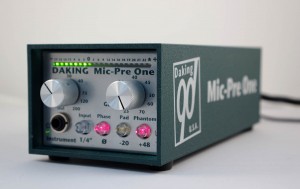
The Mic Pre One by Daking Audio

The Mic Pre One by Daking Audio

Here’s the answer:

Gain Explained

The “Gain” control is not a volume pot. It will not shut off the signal. It controls the amount of gain the mic pre can produce. The minimum gain is about 25 db, (or 5db with the pad in) and the maximum is >70db (about 10 dB more than most pre-amps.)

Microphone Output Explained

All microphones have different output levels. Ribbons generally have the lowest outputs while condensers have the highest. Dynamics are somewhere in the middle.

If you mic a guitar amp with an RCA 44 (the premier ribbon mic), you will probably need to add gain. If you use a Neuman U87, you will need the pad. That’s why condenser microphones usually have pads built in.

How to Use the Pad Control

Some people believe that the pad changes the sound. Not really true. Most good preamps have an input impedance of 1200Ω. This is the “load” or “termination” that the microphone is looking for. The frequency response of a mic is frequently affected by the load so they are optimized for this standard reflected impedance. In many mic pres, the reflected impedance changes when the pad is inserted, so the mic behaves differently when padded. We are very careful to see that this does not happen with our pres, the impedance does not change.

Do Not Fear the Pad.

2 Responses to “Mic Pre One, Mic Pre IV and Gain”

  1. eng0109 says:

    Thanks for this. I couldn’t figure out why I was still peaking out on my snare drum tracks even with the gain turned all the way down. I will use the pad from now on. I was just moving the mic further away, but then I was getting too much bleed.

  2. admin says:

    Thanks eng0109:
    Snare drum timbre can be changed a lot by mic placement. In general, pointing the mic towards the center of the drum produces more attack and less ring, while pointing toward the rim yields more ring and less attack. The further away the mic is, the more natural the mic will sound, but the more the hi-hat, and the other drums will bleed into the mic. I prefer to place my top mic further away from the drum head (around 6″ above the rim), with a cardioid (SM57, Audix i5, RE20) or a hyper-cardioid (BETA57, BETA56, Audix D2) pointed dead center. Use a hyper-cardioid if you’re getting too much bleed, because it helps to reject the sounds to the sides. Note that hyper-cardioids, do pickup immediately behind the mic as well.
    -Hendrik XIX

Leave a Reply